 Qply
Qply
10 AI Chatbot Best Practices That Actually Convert Visitors (2026)
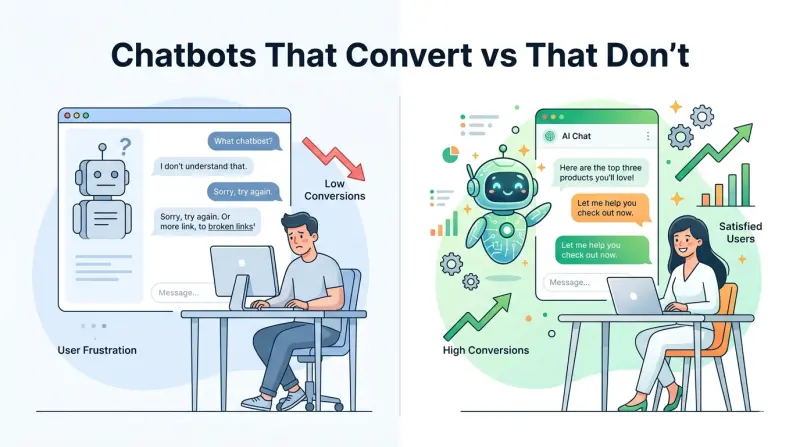
Most AI chatbots underperform — not because the technology is bad, but because they're poorly configured. A chatbot with a thin knowledge base, a robotic tone, and no escalation strategy will frustrate visitors and hurt your brand. A well-configured chatbot, on the other hand, can be one of your highest-performing conversion and retention tools.
This guide covers 10 concrete AI chatbot best practices that separate the chatbots that convert from the ones that annoy. These apply whether you're running an e-commerce store, a SaaS product, a services business, or anything in between — and all of them are directly applicable to Qply.
The Foundation: What Makes a Chatbot Actually Good
Before the tactics, one principle: a chatbot is only as good as the knowledge you give it. The most sophisticated AI model will fail if your knowledge base is thin, outdated, or ambiguous. Every best practice below assumes you're starting with a commitment to maintaining high-quality, up-to-date content. Build that habit first.
The 10 Best Practices
Build a deep, structured knowledge base before going live
The most common mistake teams make is launching with 5–10 FAQ entries and wondering why the AI can't handle most questions. A production-ready knowledge base should cover: your full product/service description, pricing details and plan comparisons, shipping and return policies, common troubleshooting steps, onboarding flows, and your top 30 historical support questions. Spend at least 3–4 hours on this before your first visitor interacts with the bot. You won't regret it.
Match your chatbot's tone to your brand voice
Your chatbot is a brand touchpoint. If your website copy is warm and casual, a stiff, formal chatbot creates cognitive dissonance. If your brand is professional and precise, a chatbot that uses slang feels off. In Qply's dashboard, you can set a custom system prompt that defines the AI's personality — use phrases like "conversational but professional", "friendly and concise", or "technical and precise" to guide the tone. Test it with a few edge-case questions to see how it interprets your instructions.
Configure page-specific proactive messages
A generic "Hi there! How can I help?" pop-up on every page is easily ignored. A context-aware message on a pricing page — "Comparing plans? I can help you find the right fit." — gets engagement. Configure proactive triggers tied to specific URLs: pricing pages, product pages, checkout pages, or high-intent landing pages. The more relevant the message to the visitor's current context, the higher your chat engagement rate.
Never let the AI guess — set clear confidence thresholds
A chatbot that makes up answers is worse than no chatbot. Configure your AI to acknowledge when it doesn't know something and offer an escalation path — "I'm not sure about that specific question. Would you like me to connect you with a team member?" Honesty builds trust. An AI that confidently gives wrong information destroys it. In Qply, use the fallback response settings to control exactly what the bot says when its confidence score falls below your threshold.
Design smart escalation flows — not just "talk to a human"
Escalation should be structured, not a dead end. When a visitor needs a human, hand off the conversation with their preferred contact method, summarize the chat for the agent, and set an expectation for when they'll hear back. A cold "I'll connect you with a human" that leaves the visitor waiting with no context is a poor experience. A warm handoff that says "I've passed your question to our team — they'll email you at [email protected] within 2 hours" is much better.
Use suggested replies to guide conversations
For common entry points — pricing questions, account issues, feature inquiries — pre-populate the chat with suggested replies or quick-select buttons. This reduces typing friction, helps visitors find answers faster, and steers conversations toward topics your knowledge base handles well. Think of them as signposts, not limitations. Visitors can always type freely; the suggestions just make it easier to get started.
Keep responses concise and scannable
Chat is not a help center article. Nobody wants to read 400 words in a chat bubble. Configure your AI to give answers in 2–4 sentences for simple questions, with a "Want more detail?" option for complex topics. Use line breaks to separate key points. Avoid jargon unless your audience expects it. If the full answer genuinely requires length, link to a relevant help article rather than pasting the entire content into the chat window.
Update your knowledge base every time you update your product
A chatbot that confidently states outdated information — wrong pricing, deprecated features, old policies — is actively harmful. Build a habit: every time you change a price, update a feature, or revise a policy, update the corresponding knowledge base entry on the same day. In Qply, you can receive alerts when specific knowledge base entries haven't been reviewed in 30+ days. Enable these to stay ahead of drift.
Measure what matters: deflection rate, CSAT, and unanswered questions
Most teams set up a chatbot and forget to measure it. Track three metrics: (1) Deflection rate — what percentage of chats are resolved without human involvement; (2) CSAT (Customer Satisfaction) — use a simple thumbs up/down or 1–5 star rating after each AI-resolved conversation; (3) Unanswered questions — the report in Qply's analytics that shows every question the AI couldn't confidently answer. Review this weekly and use it to prioritize knowledge base improvements.
A/B test your greeting messages and proactive triggers
Small changes to your widget's opening message can have outsized effects on engagement. Test "Can I help you find the right plan?" vs "What questions do you have about pricing?" on your pricing page. Test trigger timing — a message that fires 10 seconds after page load often outperforms one that fires immediately. Use Qply's widget analytics to measure engagement rates across variations and adopt the winning configuration.
Industry benchmarks for AI chatbot CSAT (customer satisfaction) typically range from 70–85% for well-configured bots. If you're below 70%, the most common culprits are: incorrect answers from an outdated knowledge base, responses that are too long or too robotic, and escalations that leave customers without a clear next step. Review your 1-star rated conversations weekly to find the patterns.
The Tone Mistake Most Chatbots Make
One of the most common chatbot tone failures is over-apologizing. An AI that starts every response with "I apologize, but I'm just an AI and may not have all the answers..." signals low confidence, wastes words, and frustrates visitors. You don't need to disclaim that you're an AI on every message — most users know.
Instead, be direct and helpful. Lead with the answer, then offer follow-up options. Compare:
"Our Pro plan includes unlimited seats and priority support. The main difference from Starter is the API access and custom integrations. Would you like me to walk through the full comparison?"
"I'm sorry, as an AI assistant I may not have complete information about all our pricing plans. However, based on what I know, I believe the Pro plan might include some additional features. You may want to check our website for the most accurate information."
You can give your chatbot a name and persona ("Meet Aria, our support assistant") without being deceptive. If a user sincerely asks "Am I talking to a human?", the bot should always answer honestly. Qply's default behavior follows this principle — it never claims to be human when directly asked.
Putting It All Together: A 30-Day Launch Plan
Here's a realistic timeline to go from zero to a high-performing AI chatbot:
- Week 1: Set up Qply, build your core knowledge base (top 30 questions), configure tone and escalation rules. Soft-launch on a single high-traffic page.
- Week 2: Review the "unanswered questions" report daily. Add 5–10 new knowledge base entries per day based on real gaps. Test proactive message triggers on 2–3 page types.
- Week 3: Enable CSAT ratings. Review low-rated conversations. Adjust response tone and length for the most common complaint patterns. Enable site-wide widget.
- Week 4: Run your first A/B test on greeting messages. Compare deflection rate and CSAT vs. week 1 baseline. Set monthly review cadence.
Following this plan, most teams see a deflection rate above 60% by the end of week 4, with CSAT scores above 75%. See our guide on how AI live chat cuts support tickets by 80% for the metrics framework behind these numbers.
Don't forget mobile. Over 50% of your chat conversations will likely happen on a phone. Test your widget on multiple mobile devices and screen sizes. Confirm that the chat window doesn't cover your main CTA buttons, that the keyboard doesn't push the chat off-screen, and that the suggested reply buttons are large enough to tap comfortably. These small details have a meaningful impact on mobile CSAT scores.
Final Thoughts
The difference between a chatbot that converts and one that frustrates comes down to configuration, not technology. The AI models powering modern chat tools — including Qply — are capable of handling the vast majority of customer conversations with genuine quality. Your job is to give them the knowledge, the tone guidelines, and the escalation paths they need to do that well.
Start with a strong knowledge base, iterate weekly based on your analytics, and treat your chatbot as a product that needs ongoing attention — not a one-time setup. Do that, and you'll have a support and conversion tool that handles repetitive questions automatically and frees your team for higher-value work.
Frequently Asked Questions
What are the most important AI chatbot best practices?
The five that matter most: (1) build a deep, specific knowledge base before going live, (2) set confidence thresholds so the AI only answers what it knows, (3) design a clear escalation path to a human, (4) match tone to your brand voice, and (5) review your unanswered questions report every week and fill the gaps.
How do I make my chatbot more effective?
Knowledge base quality is the biggest lever. A chatbot trained on vague content gives vague answers. Write clear, specific answers for your most common questions, organize them by topic, and test different proactive greeting messages — the right trigger at the right moment can double engagement rates.
What should a chatbot never do?
Never guess or hallucinate when uncertain — say "I'm not sure, let me connect you with a human" instead. Never use a tone that clashes with your brand. And never make it hard to reach a real person; a blocked escalation path destroys trust and CSAT scores.
How do I measure chatbot performance?
Focus on three metrics: deflection rate (conversations resolved without a human), CSAT score (satisfaction rating after the chat), and unanswered question rate (queries the AI couldn't resolve). Qply's analytics dashboard surfaces all three automatically.
How often should I update my chatbot's knowledge base?
Every time your product, pricing, or policies change — immediately. Beyond that, do a weekly review of your unanswered questions report and a monthly audit of the full knowledge base to catch outdated content.
Build a chatbot that actually converts
Qply gives you the AI, the analytics, and the customization to get it right. 14-day free trial · cancel anytime.
Start free trial →